
WARNING!
Selling ads directly can have high rewards, but not for your "average" publisher. It's also extremely time consuming. If you're not already 100% sure that you MUST sell ads directly, you're most likely better off joining an ad network. Click the button below to find the best ad network for your needs!
This guide covers the basics of selling advertisements directly, allowing publishers to cut out ad networks and maximize the amount of revenue they take home.
Included in This Guide
- Should You Sell Ads On Your Website Directly?
- How to Sell Ads on Your Website Directly: 11 Tips & Tricks
- Declaring Your Independence From Ad Networks
- Average CPM Rates
- Three Ways To Find Out Just How Awesome (And Valuable) Your Audience Is
- What Is A Media Kit? (And How to Make an Awesome One)
- Seven Examples of Media Kits That “Make It Rain”
- How to Make an Awesome, Free Media Kit in Under 2 Hours
- How to Find Advertisers For Your Website
- 10 Free Tools to Help You Sell More Ads
- 10 Unique Ideas To Include On Your Next Proposal
- Ultimate Guide to Native Advertising
- How To Create A Spec Sheet
- How to Create A Rate Card
Should You Sell Ads On Your Website Directly?
For many websites, both large and small, display advertising is often one of the most meaningful sources of revenue. Many publishers elect to take the simplest and easiest route to a display advertising paycheck, enrolling with display ad networks such as Google AdSense to fill their inventory.
The alternative, of course, is to sell ads directly to advertisers, cutting out the middle man and keeping the entire amount for yourself. Most publishers could make significantly more money from their websites if they were able to sell display ads directly to advertisers and remove ad networks from the process entirely. But that doesn’t necessarily mean you should dive right in; direct ad sales aren’t appropriate for everyone.
Below we pose four questions to help you determine if you should focus energy on cultivating direct ad relationships. If you don’t have any assets to monetize yet, head over to our homepage and learn how to start your own blog.
Question #1: Do You Have A Boatload Of Traffic?
For smaller publishers and websites, direct ad sales might not be a huge priority. Ask yourself how much additional money you stand to make if you’re successful in your efforts to go direct; if the answer is a big number, it might make sense to move forward.
Below is a screenshot from Google AdSense that outlines the revenue share ratios in effect for most publishers:

In other words, Google gets 32% of the amount advertisers pay to appear on every site in its network. But the dollar translation of that will vary considerably. If your site generates $10,000 in monthly revenue, you’re effectively paying Google $3,200 every 30 days to manage your ad sales process. If you’re able to sell directly, it could mean another $35,000+ in annual revenue. (Note that this assumes zero “uplift” in the rates you’re able to demand by establishing direct ad sales relationships; some publishers will be able to increase both the gross CPM advertisers pay as well as their cut.)
If, however, your site is making $100 a month in display advertising your upside ($32) is going to be much smaller. It’s probably not worth investing both time and money to potentially make another few bucks a month.
Bottom Line: If your site gets significant traffic–use 50,000+ visits a month as a rule of thumb–there could be major upside to selling directly.
Question #2: Do You Have A Valuable (Targeted) Audience?
If you have a valuable audience, it’s very possible that you’re not being compensated sufficiently for the ads you display to them. Display ad networks tend to charge too little for valuable audiences, since they get thrown in with the rest of the lower quality sites.
An audience doesn’t necessarily have to be rich to be valuable to advertisers. In fact, it’s more important that your audience is targeted–consisting of visitors with common interests. For example, an audience consisting entirely of teenage video game enthusiasts likely doesn’t have a very high average net worth or household income. But it will still be extremely attractive to game and console manufacturers.

Bottom Line: If your audience shares common interests (and buying habits) your site could be attractive to certain advertisers looking to purchase directly from publishers.
Question #3: Are There Active Endemic Advertisers?
A large and targeted audience may make your site a great fit to sell ads directly. But that supply of high quality ad inventory is relatively worthless if there isn’t any demand for it from would be advertisers. In order to have a chance at success in direct ad sales, you need to be able to identify potential clients to whom you can pitch your site.
Note the word “active” in the question above. There are logical potential advertisers for just about any niche imaginable–meaning that there is probably someone out there who should be advertising on your site. But it’s really only relevant if they are actively advertising. (Many companies have no marketing budget and couldn’t run on your site even if they wanted to.)
Sticking with our example above, a gaming site would have plenty of potential advertisers; companies are regularly promoting new games and consoles, and often have significant advertising budgets to reach out to targeted audiences.
Bottom Line: Direct ad sales will be much easier if there are advertisers who logically belong on your site and are actively spending on promotion. If you can easily think of multiple advertisers who you see elsewhere on the Web (or even on your own site) and who would be a good fit with your audience, you might be on to something.
Question #4: Do You Have Direct Relationships?
You might not think to ask yourself this question when contemplating selling ads directly, but it’s incredibly important. Perhaps the hardest part about direct ad sales is making the correct contact–getting a “decision maker” to respond to your call or email. Direct relationships with potential advertisers, however informal, can be leveraged into more formal arrangements that send you revenue.
Bottom Line: If you have any direct relationships with companies that might advertise on your site, you’re a lot closer to selling ads directly than you might think. Don’t be afraid to approach them about the topic; if you really do have a targeted and relevant audience, you have an extremely valuable service to offer them.
So…Should You Sell Directly?
If you answered “yes” to more than one of the questions above, there may be an opportunity for you to significantly increase the revenue your site is generating by investing some of your time in direct ad sales. That is often a long and challenging process, but can be quite lucrative if done correctly.
How to Sell Ads on Your Website Directly: 11 Tips & Tricks
One of the biggest challenges and opportunities in monetizing a website relates to selling ads. The vast majority of Web publishers rely on others to sell their ads–specifically, ad networks that match up buyers with inventory. While that route is by far the easiest to implement–in some cases it can be done in a matter of hours–it’s far from the most lucrative. Selling ads directly to relevant, premium advertisers can result in a significant increase in total revenue for websites with a large audience.
Unfortunately, weaning yourself off of ad networks and into direct relationships is a long, hard process. Below are several tips and resources designed to help out in this process. (For more, be sure to sign up for the free MonetizePros newsletter.)
Making a Media Kit
One of the first things you’ll need to do is create a media kit, a document that conveys information about your site’s content, audience, and advertising opportunities. (MonetizePros members can use our handy Media Kit Generator tool.)
- Review Other Media Kits for Inspiration. There are thousands of existing media kits out there already; take some time to review what others have created, and pick and choose the pieces of those that you like. To get started, check out our profile of Seven Media Kits That Make It Rain.
- Collect Data on Your Audience. If you’re able to demonstrate that your audience is unique and appealing to certain advertisers, the process of selling ads directly gets much, much easier. Spend some time thinking about how best to highlight the appealing attributes.
Finding Advertisers
If you want to maximize your ad revenue and develop relationships for the long term, you don’t want just anyone advertising on your site. Ideally, you’ll forge relationships with those who will get the most value from advertising on your site, because those will be the clients who will be able to pay the most. Here are some tips for finding those potentially elusive ideal advertisers:
- Scour Your Competitors. The ideal advertiser for your site is one that both: 1) has a product or service that is a match for your demographic and 2) is actively advertising online. If you’re familiar with sites that are generally similar to your own, these can be great places to look for potential clients that meet both of these criteria.
- Look No Further Than Your Own Site! If you’re currently using an ad network such as AdSense, it’s likely that the “best fit” advertisers for your site are already there. Keep an eye out for the ads appearing on your site (while, of course, NOT clicking on them) to grow your list of potential advertisers.
- Force Those Advertisers to Go Direct. If there are advertisers appearing on your site with whom you’d like to establish direct relationships, it’s possible to cut off the path to your site forged through ad networks. Doing so forces them to buy directly from you (assuming that they want to be on your site). Simply block them through the ad network(s) you’re using, and then they’ll have to buy from you if they want to continue to appear there. Different ad networks have different processes for doing this; in AdSense, it’s very easy.
Finding Contacts
Once you know which brands you want to target, you’ll need to find the contact information for the appropriate people who make the actual buying decisions. Sometimes, it’s as easy as looking on the website and looking up an email address. But in most cases (particularly with larger brands), finding the right person to contact can be very challenging. Here are a few tips:
- Take Advantage of Free Resources. One of the best free resources out there for uncovering contacts is SellerCrowd, an online forum with thousands of threads full of valuable information (as well as a generally responsive and knowledgeable community).
- Upgrade to LinkedIn Premium. Job descriptions on LinkedIn are a great way to track down the person (or people) with whom you need to get in touch. Paying the monthly fee to upgrade to LinkedIn premium makes it a lot easier to uncover people in your network who may be able to make an introduction, as well as to see more complete data about potentially valuable contacts.
- Seek out Introductions. When it comes to selling ads, a personal introduction is worth a thousand “cold” emails. Search for common contacts in your network who may be able to make personal introductions; it will accelerate your efforts tremendously.
- Buy Detailed Ad Seller Data. If you have a significant budget and want to accelerate the process, there are services out there that will sell you pretty detailed information such as names, phone numbers, and email addresses. Ad Data Express and Redbooks are a couple of the larger solutions out there.
Breaking Through
Once you know who you’re supposed to talk to, your job is still far from complete. Here are a couple tips to help in the outreach process:
- Don’t Be Afraid To Brag. Assuming you have a valuable and targeted audience, don’t be humble about what you’ve built! Share the impressive numbers about how large and how valuable your site is.
- Short = Sweet. There will be a temptation to write lengthy emails highlighting every aspect of your site and audience. Avoid that temptation and keep your emails short and to the point. Throw out a couple numbers that demonstrate how valuable your audience is, and a sentence or two explaining why you know it would be a good fit. Less is more!
Remember, numbers are worth a thousand words when it comes to pitching your site; focus on the statistics, and your work becomes a bit easier.
Bottom Line
Selling display ads directly to advertisers is a tremendously challenging process. But if you’re able to crack the code, it can be very rewarding financially. Among other things, you’ll need to be creative and persistent in this process.
Declaring Independence From Ad Networks
The following article was originally published during the Fourth of July holiday as a light, fun piece. But as we started putting this e-book together, this seemed like a perfect place to include it.
Finding the right display ad network and optimizing the integration into your site has helped countless Web entrepreneurs become profitable and build sustainable businesses. But the real opportunity in display ad monetization exists when publishers are able to say goodbye to ad networks and establish relationships directly with relevant, premium advertisers.
In honor of the Fourth, here are four tips for making the break away from ad networks and unlocking the potential of your display ad inventory.
Tip #1: Build That Media Kit!
If you want to sell ads directly, you’re going to need a media kit that highlights your audience and conveys the opportunities advertisers will have to reach that audience. Put some time and effort into a quality media kit; this is your opportunity to show off to potential partners by highlighting what makes your site unique and your audience valuable.
Putting together a media kit gives you a document you’ll need for the sales process, but perhaps more importantly gets you thinking about the unique aspects of your site and audience and the advertisers whom you’ll want to eventually target.
Tip #2: Start Your Homework
A big part of building display advertising relationships is done long before the first phone call is logged or first email is sent. Before you can begin the outreach part of this process, you need to come up with a good, targeted list of advertisers who can and should be marketing their products or services on your site.
This might sound like a simple step, but it’s not always quite so straightforward. Most advertisers–the vast majority of them in most cases–won’t derive significant value from appearing on your site. You’ll be better off if you focus your efforts on companies who are uniquely positioned to benefit from getting their message across to your audience.
Tip #3: Devote Some Time
As an entrepreneur trying to make your website successful, you’re constantly being pulled in several different directions. You have an audience to build, content and tools to develop, bugs to fix, and relationships to manage. It’s easy for ad sales efforts to slip through the cracks, especially because the payout from this initiative is not instant (whereas many of your other duties bear more immediate fruit).
Set aside at least a half day each week–every Tuesday morning or Thursday afternoon, for example–to dedicate exclusively to the tasks above. Turn off the phone, don’t check your email, and make it clear to co-workers that you’re off limits for the next few hours. Then put your head down and get to work making a media kit, prospecting for potential advertisers, and doing outreach and follow-ups.
Tip #4: Try Out Other Monetization Opportunities
Most publishers have their hearts set on running CPM and CPC campaigns on their sites, and spend the majority of their time pursuing these types of arrangements. But don’t be afraid to think outside the box a bit and experiment with other arrangements. For example, brainstorm merchants in your industry with whom an affiliate marketing relationship might make sense. Or if you have a paid product available on your site, consider using display ad inventory to drive leads through that funnel.
The optimal use of your display inventory may be something besides the traditional ad campaigns; keep an open mind and be willing to experiment with different types of implementations.
Bottom Line
If you’re serious about building a display advertising business, you have a lot of work and a number of challenges ahead of you. But there’s a very attractive reward at the end of the road if you’re able to overcome those obstacles. Hopefully the suggestions above provide some guidance and structure along the way.
Average CPM Rates
Anyone monetizing a website through display ads wonders at some point how their earnings compare to their peers. Display ad earnings can be standardized through the CPM metric–or, more appropriately, revenue per thousand impressions (RPM). This figure refers to the cost to advertisers (which equates to revenue for publishers) for 1,000 ad impressions. So it makes it possible to compare the earnings rates for sites regardless of audience sizes.
Calculating an “average” CPM (or RPM) is of course very difficult. The revenue earned will depend in large part on the demographics of the audience and the focus of the site. When it comes to display advertising, not all Web traffic is created equal. Some audiences are much more attractive to advertisers than others, and some verticals can command much higher rates. The more valuable the audience (i.e., the wealthier and more likely to be making a purchase), the more a site will make per visitor.
Even among similar sites, the earnings depends quite a bit on the site layout; the positioning and appearance of ad units can have a major impact on clicks and earnings. A poorly structured site in a valuable niche could very possibly make less than an optimized site in a less valuable vertical.
Read more on What Are the Average CPM Rates?
Three Ways To Find Out Just How Awesome (And Valuable) Your Audience Is
Earlier we posed four questions to website owners wondering if they should be selling their ads directly, as opposed to utilizing a third party network. If your answers led you to believe that you should be going direct, one of the first exercises you’ll need to complete involves getting some data about your audience.
Why You Need Good Audience Data
When you begin the process of selling ads directly (or otherwise trying to monetize your site without the help of networks and middlemen), it’s only a matter time before you get asked to share demographic information about your audience. Advertisers are often trying to reach specific segments of the population, and want to be sure that their dollars are spent going after relevant demographics.
Getting data on your audience might seem like an overwhelming task. After all, how are you supposed to know who is visiting your site when their interaction occurs through the anonymity of the Internet. In most cases, visitors are free to come to and go from your site as they please, without telling you a thing about themselves.
But there are a few relatively easy ways to get detailed information on your audience that can help you make a pitch to potential advertisers and other monetization partners.
Source #1: Quantcast
Quantcast is a free service that can give you a ton of good data with just a small snippet of code. Once inserted, you’ll get basic demographic information about visitors to your site. Quantcast can tell you the breakdown of your audience by gender, age, education level, race/ethnicity, and household income, and can also show how you stack up to the Internet average. You’ll also get a feel for which other properties your audience likes to visit, which can be useful in both brainstorming potential clients and pitching to them.

Pro: Free and quick.
Con: Only basic data available; no customizable queries.
Cotton Delo has at Ad Age a great summary of who measures what in the online space, including a review of Quantcast and other options.
Source #2: On-Site Surveys
If you want more control over what questions you’re asking, you may want to invest in setting up your own survey. One common practice is to require visitors seeking to access certain content (for example, a free guide) to tell you a bit about themselves–perhaps answer three questions that tell you about their shopping habits, or which brands they prefer). With minimal dev work, you`ll be able to build up an internal wiki comprising of input from your user base. This can serve as a good foundation to building up a customized profile of your audience.
Of course, you have no way to force users to answer questions truthfully (as frustrating as that may be). But if the survey is relatively short and simple to follow, odds are you’ll get high participation and accuracy rates.

Pro: Free way to collect ongoing data.
Con: Delay in gathering statistically significant number of responses, as well as diminished conversion rate.
Source #3: Emailed Surveys
If you want information about your audience, perhaps the best way to get it is to simply ask them. Send an email asking users to take a quick survey, telling them that you will use the information to improve the quality of the site and the user experience (which is true; if it helps you sign up advertisers, that allows you to continue to provide content to them free of charge). If you have a good relationship with your audience, they’ll likely be willing to help you out with a few minutes of their time.
SurveyMonkey is a relatively cheap way to get results, and can be easily customized to ask the questions you want. We’d suggest keeping it to five or fewer and making answers multiple choice, but you can experiment and try longer surveys if wanted.

Pro: Fast, reliable results.
Con: Risk of driving unsubscribes and/or complaints (though this is generally small).
Bottom Line
If you’re attempting to sell ads directly, your job becomes considerably easier if you are able to effectively communicate to potential advertisers that your audience is valuable and relevant to their messaging. In order to do this, you need to know about your audience: how old they are, what interests them, and why they come to your site (among other things). Take advantage of the free resources above to get good data on your audience; it will help out tremendously when building a media kit and selling those ads!
• • •
What Is A Media Kit? (And How to Make an Awesome One)
A media kit is simply a summary of a website and the opportunities to advertise there, generally prepared for potential clients or media buying agencies who are trying to determine where their client should be spending their marketing budget. If you’re trying to sell ads directly (as opposed to monetizing your display ads through a network such as AdSense), your media kit will be one of the most important documents you make; it can be the difference between selling out your at inventory at premium CPMs and striking out completely.
Media Kit Basics
Before you start building your media kit, understand how you’ll be using it and what it should include:
- Why? Why make a media kit? The primary goal is to tell potential advertisers why they should be advertising on your site and what exactly you can offer them if they run a campaign with you.
- Who? It’s important to keep in mind that the audience for your media kit is very different than the audience for your site. Media kits are made for media buyers, who often aren’t experts on your site’s niche (more on the ramifications of this below).
- What? Where? Media kits should generally be created as PDF documents that are available for download on your website. As a rule of thumb, a good length is anywhere between three and ten pages.
- When? Before you start outreach to potential advertisers, you need to have at least a rough draft of your media kit locked and loaded.
- How? This is the toughest question to answer; below are step-by-step instructions for how to build a media kit.
Steps To Building A Media Kit
Building a compelling media kit seems like an overwhelming task for many publishers. But if broken down into a few simple steps, this whole process becomes very manageable. Here’s our step-by-step guide:
Step #0: Should You Sell Ads Directly?
Before you start making an awesome media kit, ask yourself a few questions about your site to determine if you should even be trying to sell ads directly at this point. Setting up direct ad sales relationships is a very time consuming process, and many website owners may be better off spending their time elsewhere (at least for now). Think about these four questions before you kick off the media kit process. Even if you’re certain that you should be selling directly, asking yourself these questions can help to properly frame the process of building a media kit.
Step #1: Collect Data On Your Audience
A primary goal of the media kit is to convey to advertisers just how unique and valuable your audience is. In order to do that, you need to know more than just how many daily visitors you get. Here are some of the most basic and common questions advertisers will want your media kit to answer:
- How old is the audience?
- What’s the breakdown between males and females?
- What percentage of visitors have kids?
- What’s the average annual income / total wealth of visitors?
- Buying Habits
There are several ways to collect good data about your audience, including many free resources.
Step #2: Make An Intro
Think of a media kit as having three primary objectives:
- Introduce the reader to your site
- Explain why advertisers should be on your site
- Explain exactly how advertisers can spend money on your site
The first objective should be short and sweet; give the reader a quick overview of your site without getting too sophisticated or going on for too long. Hit the high points: what topic(s) does your site cover, what type of content does it contain, and why to visitors come to you. The media kit for MensHealth.com accomplishes this nicely; the first two pages clearly convey the type of content the site features and why its users go there:

Keep in mind that the people who will be (hopefully) seeing this media kit may be hearing about your site for the very first time. They also don’t have a ton of time to spend learning the ins and outs of every new site they come across, so it’s up to you to communicate the highlights and voice of your site as concisely as possible.
Here’s the second page from Men’s Health, which contains a “Mission Statement”:

Step #3: All About Your Audience
Once you’ve made the intro it’s time to get into the sales pitch: why advertisers should have a presence on your site. The easiest way to do this is to prove that you have a unique and valuable audience that they will want to reach. The more stats you can show here the better; this section of a media kit should be as quantitative as possible. There are four general types of statistics that you can show to demonstrate how valuable your audience is:
- Engagement. These stats communicate facts such as size of audience (number of unique visitors and pageviews) and growth (increase in visitors over past year), as well as level of engagement. Consider showing metrics such as average time on site, percentage of traffic from return visitors, and number of pageviews per visit. All of these stats can be found in Google Analytics.
- General Demographics. You’ll want to share some basic demographic stats such as age and gender distribution and income and education levels. Quantcast is a free and easy way to get this type of information.
- Niche-Specific Characteristics. In addition to the basic demographics, you’ll ideally show some survey data that applies specifically to your niche. For example, if you’re creating a media kit for a site for car enthusiasts, you may want to show what percentage of your audience is expecting to buy a new car this year. This detailed information takes a bit more work to get; you’ll need to run some kind of site survey and ask your readers for their input.
- Social Media Following. If you have a significant presence on social media, let potential advertisers know. This information can be pretty basic: Twitter followers and Facebook Likes are sufficient to get the point across.
Check out page 3 of the Entrepreneur.com media kit for a great example of a killer “stats page”:

Step #4: Advertising Opportunities
Once you’ve (hopefully) convinced readers that they should be advertising on your website, show them exactly how they can advertise on your website. This can be as simple as screenshots of your website that show where advertisers can expect to see their creative. Of course, more unique placements should be illustrated as well.
Below is a page from theCHIVE.com’s media kit (click to enlarge) showing off the goods:

Step #5: Go The Extra Mile
At this point, you’re done; you should have a functional media kit that you can use in your ad sales efforts. But there are a few relatively easy tasks that you can complete to make your media kit stand out a bit more:
- Throw in some images. A few slick pictures in your media kit can make all the difference in the world. Buy a few images from a site like Photodune (they’ll cost you a buck each) and insert into logical places.
- Add Testimonials. If your site has received any positive press or if you have users who have said (or would be willing to say) kind things about you, include some testimonials in your media kit! The Weekly Standard media kit has an extensive testimonial section.
- Include a “Past Advertisers” slide. If you’ve ever had advertisers run on your site, you might want to leverage their brands as a proof of quality. Basically, show off the brands that have marketed their products on your site; if it’s good enough for them, it will be good enough for some of the other companies you’re going after.
Step #6: Create Rate Cards and Spec Sheets
Once your media kit is complete, there are a couple of follow-up tasks that you’ll want to tackle as well. If you have any luck with ad sales, it won’t be long before a media buyer asks you to produce a rate card and/or spec sheet.
Tips For Making A Killer Media Kit
We’ll leave you with some general tips for assembling your first media kit; if you want us to take a look when you’re done, become a MonetizePros member and post it in our forum:
- Keep It Simple. Your goal is to tell people a lot about your site with not a lot of real estate. Act as if you’re explaining your website to your grandmother; avoid technical jargon and just stick to simple descriptions.
- A Number Is Worth A Thousand Words. When painting a picture of your audience, do it with cold, hard stats. Numbers (such as average age, income, and gender breakdown) tell a lot about your site in a very precise way. Check out our post on how to quantify your audience if you need help coming up with reliable numbers.
- Don’t Be Afraid To Brag. A media kit is a chance to show off; there’s no reward for being humble, so find the presentation and numbers that flatter your work.
Examples Of Media Kits
For some real-world examples of media kits that effectively communicate the value of the site to potential advertisers, be sure to check out our feature on Seven Media Kits That “Make It Rain”.
If you’re looking for something very basic, we also have a free media kit generator and a sample media kit template.
• • •
Seven Examples of Media Kits That “Make It Rain”
If you’re looking to improve your display ad monetization by moving away from networks and starting to establish direct relationships, building a media kit is one of the most important and most challenging tasks you’ll take on. We recently put out our sample media kit template, which serves as a starting point for those looking to build a sales package for their blog or website. Today we’re highlighting several examples of well-done media kits that can serve as templates and inspiration for those about to tackle this task.
See the Seven Examples Of Media Kits That “Make It Rain”
• • •
How to Make an Awesome, Free Media Kit in Under 2 Hours
For site owners who have plans of selling ads directly to premium advertisers and weaning themselves off of ad networks such as Google AdSense, one of the first steps in the process is developing a media kit that offers a “snapshot” of your property and audience. This process can be intimidating if you’ve never done it before, so we’ve put together a guide and template.
Below is a step-by-step guide for creating a quality first draft of a media kit, including the resources used for various features of the document. You can view a PDF of our media kit, or open up a Google doc that can be edited to include your site’s information. (We don’t mind.) If you want some additional inspiration for an extended media kit, revisit Seven Media Kits That Make it Rain above.
Google Presentations
We used the presentation option within Google Drive to create our PowerPoint-stye media kit. This is basically a cloud-based alternative to PowerPoint that can be used by anyone with a Gmail address. We selected one of the dozen or so pre-loaded slide themes (Paper Plane), though there are several sources of additional templates if you want to get even fancier.

Cost: Free, though you’ll need a Gmail account to create presentations (instructions here).
Awesome Screenshot
For capturing and editing pictures of your site, Awesome Screenshot is quick, easy, and free. We were able to take a picture of one of our more popular tools to include in the media kit, as a way to highlight the type of content that’s found on our site.
In addition to taking basic screenshots, this tool lets you crop, add text and shapes, and blur out any information you don’t want to share:

Cost: Free.
IconFinder
IconFinder has a huge library of icons that can be downloaded for free. There are some premium ones as well that sell for a few dollars apiece. We used this resource to find and download the icons used throughout our media kit to highlight various aspects of our audience.

Cost: Free for many of the icons, with some premium icons available for purchase (generally for $1 to $3).
Google Analytics
Google Analytics is used by just about every major website to provide statistics about traffic. Once a line of code is installed on your site, you’ll get detailed information about how many visitors are coming to your site, what they’re doing while they’re there, and why they eventually exit.
There are dozens of metrics available from Google Analytics that can shed some light on the nature of your audience. Ideally, you’ll be able to identify a few that identify your audience as engaged, loyal, and fast-growing. Some to consider include:
- Time on site
- Pageviews per visit
- % of Return Visitors
- Average Visits per Month
- Monthly Unique Visitors / Pageviews
- Geographic Location
Cost: Free.
Quantcast
Quantcast can be used to get additional data about a site’s audience that Analytics can’t provide. The demographic information is pretty basic, but it’s enough to give a good snapshot of the audience coming to your site. Metrics available include:
- Age
- Gender
- Education Level
- Household Income
Quantcast can be up and running on your site in a matter of minutes, though you will need a bit of time to collect meaningful data about your audience’s demographics.
Here’s a sample screenshot of the Quantcast data for Goodreads.com:

Quantcast can provide additional detail into each of these categories, and also shows some of the other Web properties your audience likes, as well as trends over time.
Cost: Free.
BuySellAds
In this media kit, we decided to include prices for each of the ad units available. Some publishers may not wish to have this information publicly available, preferring to share pricing info only when a serious request comes in. But if you do want to include, you may want to do some research on what reasonable rates for your niche are.
BySellAds, which functions as a marketplace for publishers looking to sell their premium inventory, is a good resource for researching appropriate CPMs.

Cost: Free (to browse at least).
Bottom Line / Final Results
Using only the free resources highlighted above, we were able to put together what we think is a pretty decent media kit that highlights our site and gives potential advertisers a good understanding of the value in promoting their products and services here. Feel free to flip through the presentation, or copy and edit the entire thing to showcase your own site.
• • •
How to Find Advertisers For Your Website
Once you’ve decided that there’s an opportunity to monetize your website more efficiently through direct sales — and you’ve made the commitment to tackling the process — it can be tough to know where to begin. You can’t just wander down Madison Avenue knocking on doors. You need to focus on a relatively small universe of the most likely potential buyers, which can be done by creating your “wish list” of advertisers who should be advertising on your site.
This becomes the list of potential advertisers you’ll want to target with your outreach efforts; eventually, these names will hopefully be converted to paying clients. Here are three strategies for coming up with your wish list of advertisers.
Before we dive in, you might want to check out Daniel Scocco’s overview of the pros and cons of direct ad sales.
Ask Yourself Some Questions
Start by brainstorming: which advertisers would derive value from advertising on my website? A few questions to ask yourself in coming up with this list:
- What topics are regularly covered on my site? Are there obvious companies who offer these products / services that would be a good fit?
- What is unique about my audience? What companies would derive value by highlighting their products / services to my audience?
It’s best to be creative here; when starting our, err on the high side in your brainstorming activities. And don’t get too caught up in seeking out hyper-targeted potential advertisers; think a bit more broadly in terms of what might fit with your demographic.
For example, a website about pregnancy/motherhood would probably be a great fit for advertisers looking to promote items like diapers, baby clothes, etc. But if you think more broadly, you’ll realize that this type of site would be a great for fit for any company looking to reach a primarily female demographic.
Here’s a screenshot from TheBump.com, a website for expectant mothers. Note the ad for “beauty balm” at the top of the page:

Keep in mind that some of the ideal advertisers you come up with in this manner won’t be worth pursuing if they aren’t actively engaged in online advertising as part of their marketing efforts.
“Ask” Your Competitors
OK, so you’re probably not going to pick up the phone and ask your competitors to help you make more money. But you can certainly spend some quality time on their sites to figure out if they’re having any success with direct ad sales. This is something you probably do already (reading up on your subject matter) but with a slightly expanded focus. Keep a close eye on the ads on the web sites in your niche, and you’ll quickly get a list of the advertisers whom you should be targeting.
This exercise is valuable because it will fill out your list with companies that you know are spending on digital advertising. Your off-the-cuff list of advertisers who would be good fits is likely to include several who don’t spend a penny online–which obviously doesn’t do you a whole lot of good. But if you’re seeing ads on competitors’ sites (or elsewhere on the Web for that matter), you’ve effectively “pre-qualified” the lead already.
Ask AdSense
If you’re interested in selling advertising directly, odds are that you’re currently using either Google AdSense or an AdSense alternative. Finding potential advertisers may involve going no further than your home page; ad networks generally do a pretty good job of showing relevant ads to your audience. (Of course, you should make sure your AdSense settings allow for targeting.)
It may seem overly simple, but often the best direct advertisers for your site are already advertising on your site. Your challenge in this case becomes cutting out the middle man, which can create significant value for both you and the advertiser.
Remember that AdSense takes a cut from every dollar of advertising revenue your site generates. For display ads, it’s a 68 / 32 split (in the publisher’s favor):

In other words, there’s an opportunity to boost your earnings significantly by going directly and capture that 32% for yourself without the advertiser paying a penny more.
If you want to force certain advertisers to go through you (and not AdSense) if they want to advertise on your site, there’s a quick and easy way to block them from buying inventory through AdSense. Within AdSense, click on “Allow & Block Ads” and then enter the URL associated with the advertiser you want to force to buy direct:

Bottom Line & Next Steps
Maintaining focus and prioritizing opportunities is a major component of successful ad sales efforts–and it starts with sketching out your list of potential clients. Of course, coming up with a wish list is one of the easier parts of the process; from here, you need to move on to figuring out who you should contact, and then begin “breaking through” to your direct advertisers.
Robert at My Multiple Incomes has some good follow-up reading on this topic.
• • •
10 Free Tools to Help You Sell More Ads
If you run a website that has a large and valuable audience, there is the potential to unlock significant value (i.e., cash flow) by weaning yourself off of ad networks and selling your valuable inventory directly to premium advertisers. Unfortunately, making this switch is much easier said than done; selling your ads is a long process that requires a great deal of time and effort.
While there’s no substitute for time and hard work, having access to some handy resources can help you work more efficiently. Below are 10 tools we’ve identified that can help publishers market their site, get in touch with the right people, and ultimately close a deal.
 Media Kits
If you want to sell ads at any sort of scale, you’ll eventually need a media kit that highlights your audience and helps advertisers figure out exactly what services you offer. Below are some tools that can be useful when building your first media kit.
- Free Media Kit Tools. This list at Hubspot has a number of great tools for putting together a media kit. Particularly useful are Skitch (for creating screenshots), IconFinder (for getting free images), and FontSquirrel (for finding creative and free for commercial use fonts).

We also have a free Media Kit Generator that can get you a basic version of your media kit in no time.
 Advertiser Research
Finding appropriate advertisers for your site can be a time consuming process. An ideal advertiser is one who would both be a good fit on your site (i.e., has products and services that appeal to your audience) and who is willing and able to spend money on marketing.
Here are a few of the tools we like for lining up advertisers and tracking down the appropriate contacts:
- SellerCrowd. This online community of media buyers is a great resource for finding out almost anything you need to know about an advertiser, a campaign, or an agency. All you need to sign up and sign in is a LinkedIn account; then you’ll have access to thousands of threads with detailed information about the appropriate contacts, relevant email addresses, and preferred strategies.In most cases, there will already be answers on the site to most questions you come up with. But in the event it hasn’t been asked before, it’s pretty easy to throw it out to the community and get a response back.

- AgencyCompile. This research tool is simple but incredibly useful. Users can enter in a brand (e.g., General Mills) and see all the agencies who work on that brand’s marketing campaigns. The database can also be searched by agency, showing all accounts that are held at a particular agency. (This can be useful if you have a good contact at a certain agency, and want to know if there are any accounts that may be relevant to your site.)There are also advanced search options that can be extremely useful in targeting certain locations or certain types of advertisers. AgencyCompile is completely free, which makes it one of the most useful tools on this list. (A few of the ones highlighted below offer limited free functionality.)

- Moat. This site provides a similar service, but is 100% free. It’s pretty easy to use: enter in a brand, and you’ll see all the advertisements being run by that brand currently (including a list of sites where they’ve appeared).This can be useful if you’ve identified a company you think would be a good fit for your property, but aren’t sure how active they are with digital advertising campaigns.

- LinkedIn. This might seem like an obvious inclusion, but it’s worth highlighting. LinkedIn is a great resource for tracking down names within the marketing department of a company or within a certain division of a media buying agency. The free version of LinkedIn gives you most of what you should need here, as long as you don’t mind stalking potential leads.
 Outreach & Sales
Tracking down the appropriate contacts for an advertiser is often very challenging. But the really tough part comes once you have names and email addresses; then you’ll need to get them to respond and eventually strike up a conversation.
Staying organized and disciplined is a big part of the ad sales process; you’ll need to be persistent in your outreach. Here are a few good free resources to help keep your prospects straight:
- Zoho CRM. This free CRM is part of the Zoho suite of business products. While Zoho doesn’t have all the features of solutions such as SalesForce, the price (free) is much better.If used correctly (i.e., in a disciplined, organized way), Zoho can be a great tool for keeping your leads organized and gradually chipping away at your “wish list” of advertisers.
- Insightly. This online CRM lets you manage contacts, existing deals, and potential new advertisers. Insightly is cloud-based (which means you can access it from anywhere) and can scale to accommodate a larger sales force down the road. Insightly is integrated with Google Apps, Gmail, and Outlook.

- Boomerang. This free extension offers up some awesome emailing capabilities, making it easier to see who has read your emails and reminding you when it’s time to get in touch with potential advertisers again. You’ll have the option to return messages to your Gmail inbox if no one replies within a set amount of time, which can be very useful when trying to juggle a number of different advertiser leads.Boomerang has a basic subscription level that is completely free. If you start using certain functionality regularly, however, you may have to upgrade; although a $4.99 monthly membership gets you just about everything you need.

Bonus Reads & Resources
In addition to the tools above, we’ve created a number of guides and tutorials to help through the ad sales process. Check out the links below for some of the resources we have here at MonetizePros.com:
• • •
14 Unique Ideas To Include On Your Next Proposal
While most display advertising revenue is generated through traditional banner ads, revenue from less traditional advertising implementations is growing significantly. Many publishers who sell directly to advertisers would like to expand beyond the IAB standard ad units in their proposals, but struggle to come up with ideas that excite advertisers without being too overwhelming from a technical perspective.
There are multiple benefits to including non-traditional placements on an advertising proposal. First, these placements help your proposal to stand out; most advertisers are always on the look-out for new ideas, and are anxious to try new, creative ideas. Second, because many of these implementations create additional ad “inventory,” they can increase your overall earnings even if the number of visitors to your site remains steady. In other words, they can help you make more money from your existing traffic base.
1. Overlay Ads
You’ve probably come across ads that pop up over a website for a few seconds. While many visitors may view these as obnoxious, they are very effective. Below is the ad that shows up over Entrepreneur.com for a few seconds when visitors navigate to that site:

Many advertisers love these types of ads because they’re hard to ignore (meaning that they know their messaging will at least be seen). These should be used somewhat sparingly in order to maintain a good user experience, but can definitely generate some incremental revenue.
2. Hello Bar Sponsorship
More and more sites (including this one) are now using Hello Bars to drive visitors to important parts of their site. While this implementation is most commonly used to highlight internal features (such as a membership or newsletter subscription), it can easily accommodate an advertiser’s messaging as well.
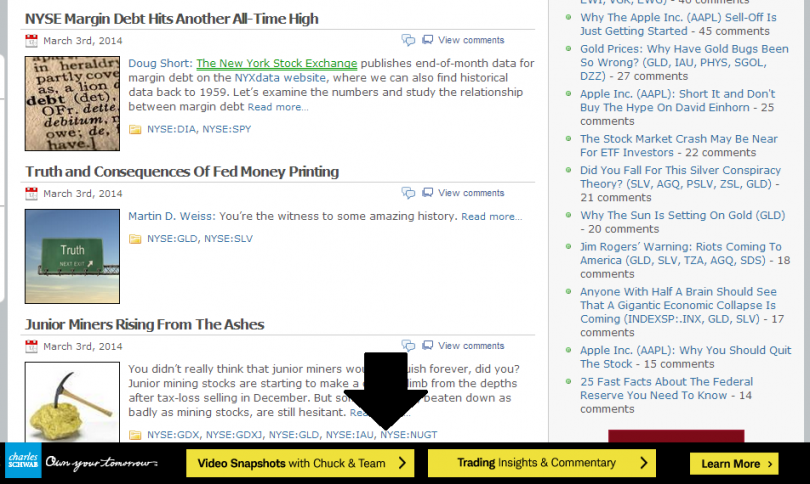
Below is another slightly different implementation of a similar idea. This may be easier to implement for many advertisers since it utilizes a standard size of creative (in this case, a 728×90 leaderboard):

3. Fly-In “Corner Ad”
A number of sites use “pop-ins” in the corners of their pages to present visitors with ways to click through to other popular pages on the site. This implementation can also be used as part of a package for a third party advertiser.
Here’s an example of this in use on Wired.com. This ad is small enough as to not be too obnoxious or obtrusive, but is effective because it naturally draws the eye of visitors.

4. Pre-Roll Video
For sites that have their own video, inserting pre-roll ads (i.e., as that run before the video plays) can be a very attractive offering to advertisers. Inserting video ads is pretty straightforward with services such as Viddler.
ESPN.com sells quite a bit of pre-roll video; they have video players integrated into most of the site, and generally run an ad before a clip from one of their shows:

5. Geo-Targeting
For some advertisers, it may make sense to target only visitors in certain areas of the country. Most ad serving platforms, including DFP, allow publishers to go all the way down to the city level.
If you have a potential advertiser who is promoting a product or service that will have regional appeal, offer to target specific regions of the country for their campaign. Here’s a shot of the control panel in DFP that allows you to target only specific ads with your campaign:

For more ways to boost performance, also see our feature on How to Improve Advertiser Performance.
6. Sponsored Articles
Allowing advertisers to sponsor articles or groups of articles is a great way to get them additional exposure without creating too much new content. There are a number of different ways that this can be packaged and presented; below is an example from Entrepreneur.com, with three different advertisers sponsoring articles:

7. Welcome Page
A “welcome page” ad implementation effectively creates a brand new page whose primary content is an advertisement. Forbes.com uses a welcome screen to show an ad whenever visitors navigate to their site:

After a few seconds, visitors are automatically forwarded on to the page within Forbes.com that they were attempting to visit. This high impact placement may lead to some user frustration, but is a great way to prominently position an advertisement. If you run this type of ad, be sure to charge a significant premium for it.
8. Email Banners
For sites that send out an email newsletters, there’s an opportunity to include advertiser banners within the body. This high visibility placement is a great way to monetize email, and something we do with out mailings:
9. App Sponsorship
If you’ve developed a mobile app on any platform, you have a great line item to add to any proposal. Offering an advertiser the ability to “own” your mobile app is a very attractive line item. This is generally done through banner ads (the 320×50 is the standard for mobile devices, while a 728×90 works for iPads).
Below is an example of a sponsored app in action; Dunkin’ Donuts sponsored the “Beat the Streak” app created by Major League Baseball:

10. Sponsored Emails
If you have a large list of email subscribers, you may be able to “rent” out this list to advertisers. If a potential advertiser is active in email marketing, offer to include sponsored emails on their next campaign. This essentially involves you (the publisher) sending an email to your subscribers on their behalf. The example below is from WhichTestWon, a site to which we subscribe. They occasionally send sponsored emails on behalf of third party advertisers:

11. Sponsored Tweets / Facebook Posts
If you have a large social media following, you may be able to monetize it by making posts that mention an advertiser. Here’s an example of a sponsored tweet from Perez Hilton, who was compensated to ask his followers to engage with the official Twitter handle for an upcoming theatrical release:

We’ve covered this topic in great detail in our feature article 101 Ways to Make Money with Twitter.
12. Webinars
Running online conferences or webinars can be a great way to generate some additional revenue. If you can present on an interesting topic and get a decent number of visitors to attend, offer up a sponsorship role to an advertiser.
Clickz.com runs webinars regularly, and signs up premium advertisers (such as IBM and Bing) to sponsor these events:

13. Sponsored Free Trial
If you have a paid product on your site, you can offer an advertiser the opportunity to “sponsor” a free trial for all visitors. This basically involves making the premium features of your product free for a set length of time, and acknowledging the advertiser as the one responsible for delivering this benefit:

14. Skins
Many sites now offer advertisers a way to take over the white space around their normal site with hard-to-ignore ads. This practice is known as “skinning” the site, and it results in a high impact ad around the borders of the normal site dimensions. Here’s an example of a custom skin on IMDb.com to promote a TV show:

This takes a bit more work from a technical perspective, but can be easily replicated once you’ve figured out the initial specifications.
Bottom Line
The opportunities for creative ad placements continue to multiply; there are dozens of unique ideas that publishers can use to improve the advertiser experience as well as their own bottom line. If you’re interested in expanding your offerings beyond banner ads, the best advice we can give is to keep your eyes open when browsing. There are creative implementations all around you; take note of those that you think are well done and easily added to your site.
• • •
Ultimate Guide to Native Advertising
Native advertising has become an increasingly popular term and concept in recent years, emerging as one of the hotter trends in the digital advertising world. While actual implementations of full scale native advertising campaigns remain far less common than traditional strategies revolving around display advertising, it seems like this marketing format is here to stay.
For many smaller Web publishers, native advertising is a new and perhaps overwhelming concept. And while some versions of this strategy are complex and difficult to sell and implement, native advertising is actually a very basic concept. Moreover, it’s possible for even smaller bloggers and Web publishers to monetize their site via native advertising without significant investments in development.
Read the Ultimate Guide to Native Advertising.
• • •
How To Create A Spec Sheet
When attempting to monetize a website through direct display advertising, there are a handful of documents that need to be assembled to make the sales process flow smoothly. In addition to a thoughtful media kit, it helps to have a rate card and a spec sheet assembled as well. That last document can be a bit challenging to put together, especially for those who aren’t familiar with the technical aspects of online advertising. This guide should hopefully help you create a proper spec sheet to facilitate the sales process.
Read How to Create a Spec Sheet.
• • •
How to Create A Rate Card
If you’re trying to sell ads for a website you own, you may have been asked to provide potential advertisers with a rate card. If you’re not sure what that refers to or how to create one, you’re in the right place. This guide will walk you through the basics of a rate card, including how to create one and tips for using it correctly.
Read How to Create a Rate Card.
• • •
RELATED POSTS




That is an awesome resource and so timely. Thank you for sharing this wealth of information.
Hi Dave,
Thanks, we are very pleased you found our resource so helpful!
Remember to sigh up to the MP weekly newsletter and you’ll never miss a post.
Amazing list, and so helpful !
Thank you for sharing
This is truly phenomenal! A must read for all webmasters/budding publishers.
Thank you for your positive feedback Jeremie!
Thanks Garrett!
Yes! Finally something about sold.
If some one wishes expert view concerning blogging then i recommend him/her to visit this website,
Keep up the good work.
Thank you for your recommendations Kai!
Thanks for sharing this information.
Great resource.
Thank you Marius!
Is there a PDF of this info?
Hi, can you explain about the CPM ads position on the page? I have some Amazon CPM ads on my blog, and Amazon told me the position on the page does not matter and won’t affect revenue. That seems to make sense, as they are based on page views, not positioning, at least according to Amazon (and I don’t know if they meant that for all CPM ads or just their own). Are they wrong? Thanks for any info.
This is absolutely amazing. Thank you so much for sharing these resources. Great help for a start up!
I have a question regarding , how do publishers (who is selling ad space directly through his website) collects money from advertisers? Is there any tool or api available for that?
@ Author
Can you please suggest me the best way for conventional Rural Advertisement??
This is a good tip particularly to those new to the blogosphere.
Simple but very precise info… Thanks for sharing this one.
A must read article!
Hello Everyone,
This is really a very relevant information
This design is wicked! You certainly know how to keep a reader
entertained. Between your wit and your videos, I
was almost moved to start my own blog (well, almost…HaHa!) Excellent job.
I really loved what you had to say, and more than that, how you presented it.
Too cool!
very attractive article i learn lot from this article thank you for this. i wanted to use my blog for adsense but google rejecting 2 times so now i can use alternate adsense option and will improve my blog as per google adsence guidelines
Excellent article. Thanks for sharing this. I have read many of that but could not found the right things. But your article clearly define me how can I attract advertisers into my website for monetization. Please keep your writing.
Nice article
You should use this email marketing platform becouse that’s important if you have a website and you want to increase views or sales