ChatGPT Business Hub gives publishers their first look at ChatGPT traffic data that comes from OpenAI itself. OpenAI launched Businesses in ChatGPT in beta on November 10, 2026, and once you claim and verify your site, ChatGPT Business Hub shows how often ChatGPT references your website, how many people click through and which topics bring you up. If ChatGPT referrals matter to your audience or revenue plan, this is the dashboard to set up before the year closes.
This guide covers what the dashboard shows, how claiming works, where the data falls short, what changed in the terms on November 18 and five smart steps for turning the numbers into editorial and commercial decisions.
Table of Contents
What Is ChatGPT Business Hub?
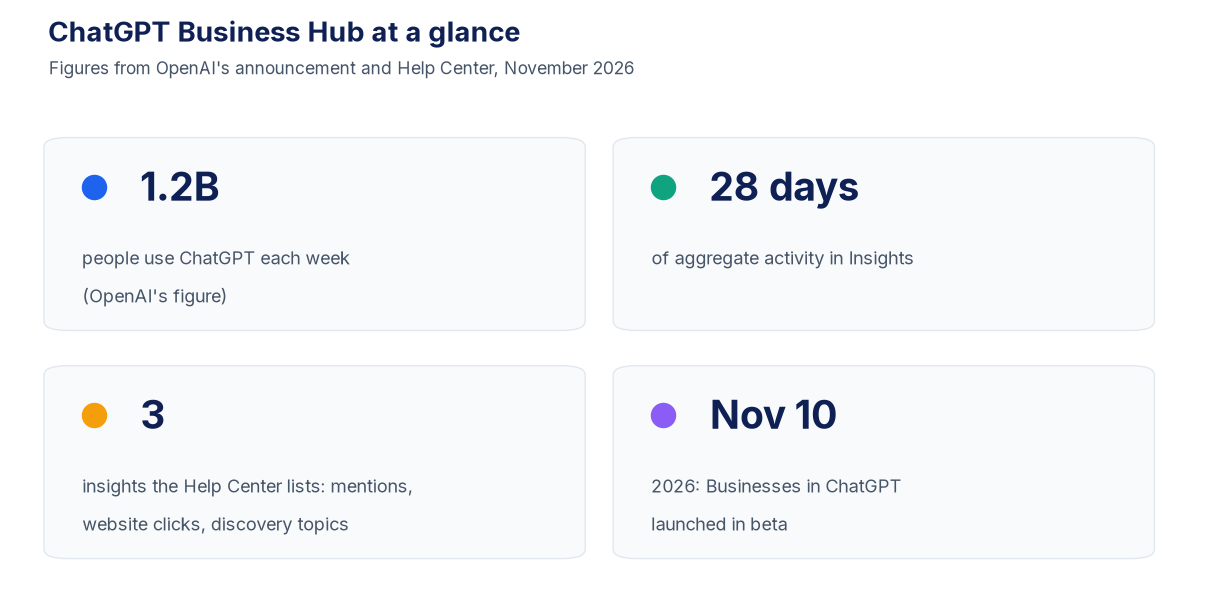
ChatGPT Business Hub is the dashboard behind OpenAI’s new Businesses in ChatGPT program. In its launch announcement, OpenAI pitched the program as a direct line to ChatGPT’s audience, which it puts at 1.2 billion weekly users. Inside ChatGPT Business Hub, a business can claim its listing, keep its details up to date and review data on how people interact with it in ChatGPT.
The launch was aimed at brands and retailers, but publishers are businesses too, and their websites are cited in ChatGPT answers. That is why Digiday’s November 19 media briefing framed the launch as an early “search console moment” for publishers. John Shehata, CEO and founder of the publisher SEO analytics firm NewzDash, told Digiday: “This is a very early, very limited Search Console moment for ChatGPT.”
There is a second piece. Eligible businesses can also build a Business Agent, a separate, clearly labeled chat that answers questions using information the business supplies. OpenAI says Business Agents are open to eligible US ecommerce and online service companies for now, and that a business can pay to promote its agent and send ChatGPT Ads traffic to it. Most content sites will start with the ChatGPT Business Hub insights, not the agent.
What the Insights Actually Count
According to OpenAI’s setup guide in its Help Center, Insights cover the past 28 days of activity, shown in aggregate. Three items are listed:
- Mentions. For online businesses, ChatGPT has to reference your website for it to count as a mention. Naming the brand on its own is not enough.
- Website clicks. How many times people follow a link from ChatGPT to your site.
- Discovery topics. Recurring themes in the ChatGPT answers where your business was mentioned or cited. OpenAI notes that these themes neither expose individual prompts nor directly gauge customer intent.
Digiday’s reporting also lists profile views among the data points. Privacy limits apply throughout. OpenAI’s announcement states: “We don’t share users’ conversations or Business Agent chats with businesses.” Insights only show up once conversation or interaction volume clears OpenAI’s thresholds.
That last point matters for smaller sites. OpenAI’s Help Center says a metric may sit blank because activity is below the reporting threshold, because data collection is still underway or because reporting is not available. A blank field in ChatGPT Business Hub is not proof of zero activity.
How to Claim Your Site
Claiming an eligible business does not require ChatGPT Enterprise or an Ads account, according to OpenAI’s Help Center. You sign in to ChatGPT, open ChatGPT Business Hub in the sidebar, look up your business by name and pick a verification method. The options offered depend on the listing and can include phone, business email, website domain or Shopify.
For most publishers, website domain is the cleanest route. ChatGPT shows a TXT record that you add to your domain’s DNS settings, then you return and select Verify domain. If someone else manages your DNS, ask them to add the record. OpenAI then reviews the claim and replies by email with a decision or asks for more information.
Approval of the claim is not the last step. You also need identity verification through Persona before you can see insights, edit your published business details, connect a product feed or launch an eligible Business Agent. OpenAI says this can require a government-issued ID, business registration details and proof that you are allowed to act for the business. The blue check badge appears after Persona verification is approved.
Once you are in, the admin who claimed the business can add teammates and grant an agency access, with each person using their own ChatGPT account. One expectation to reset early: claiming does not buy reach. In OpenAI’s words: “Claiming lets you manage the information you provide about your business. It doesn’t guarantee increased visibility or give you direct control over ChatGPT’s independent recommendations.”
What the Data Will Not Tell You
The Digiday briefing found publishers split on how useful the data will be. Three of the six large publishers Digiday interviewed were already setting up accounts. Carly Steven, Daily Mail director of SEO and editorial ecommerce, was positive: “These insights potentially provide a really valuable piece of the puzzle that should validate our own success criteria around visibility and citations.”
The limits are real, though. Shehata pointed out that ChatGPT Business Hub data comes only in aggregate: no prompts, nothing broken out by article and no benchmarks against competitors. So you can see that ChatGPT cites your site, but not which article earned the citation.
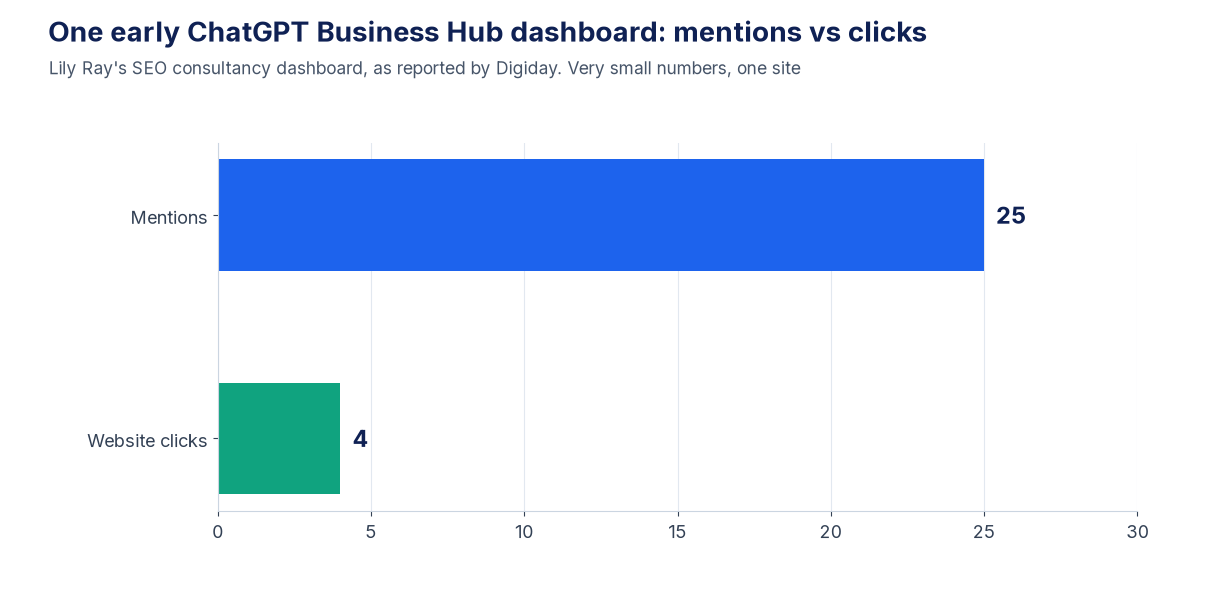
The definition of a mention also shapes the numbers. Lily Ray, vp of SEO strategy and research at Amsive, noted to Digiday that ChatGPT Business Hub counts a mention only when ChatGPT surfaces the business website, not just the brand name, and that inflates apparent click-through rates. On the dashboard for her SEO consultancy, she recorded four clicks from just 25 mentions, which she called “very small numbers in absolute terms.”
Clicks have a caveat too. A tooltip published by Search Engine Roundtable reads: “Number of recorded clicks on links to your website in ChatGPT. Clicks don’t confirm website visits or conversions.” Treat clicks as a ChatGPT side count, and check them against the sessions in your own analytics.
There is also a gap for publishers selling AI visibility services to brands. One exec told Digiday that if ChatGPT recommends a client’s product with a citation to the publisher’s sponsored article, ChatGPT Business Hub would not report that product mention to the publisher. Third-party AI visibility tools are still needed for that job.
Read the Terms Before You Sign Up
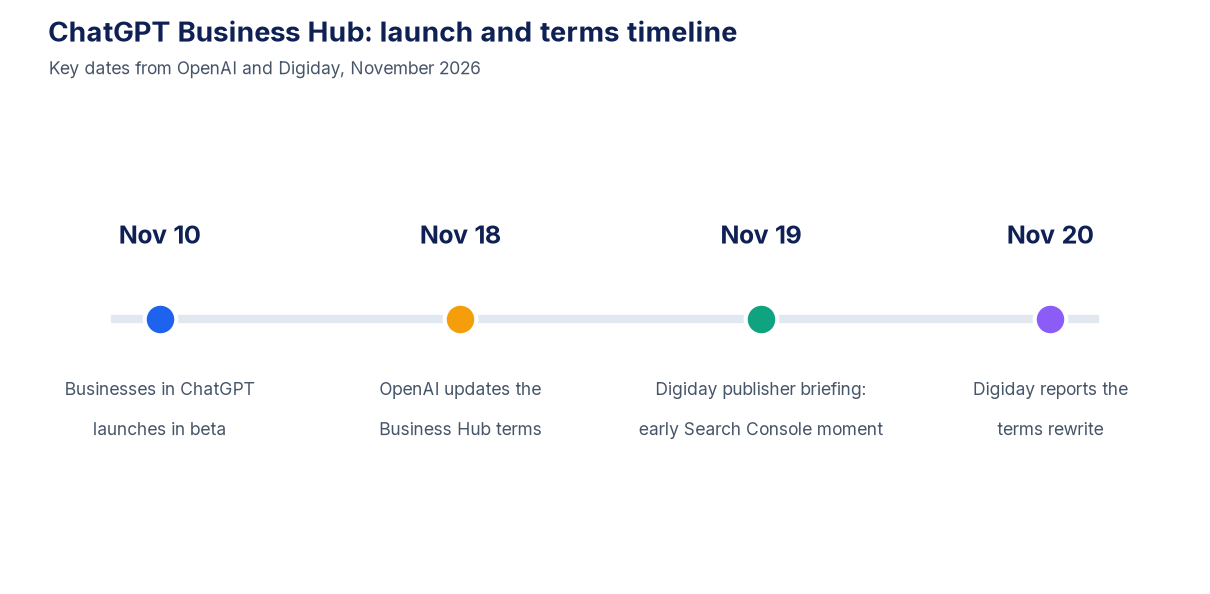
Before your legal team signs off, check which version of the terms you are accepting. Digiday reported on November 20 that lawyers read the original terms, published November 10, as possibly restricting the legal claims businesses could bring against OpenAI, and said that could reach claims over content a site had published before it signed up.
OpenAI confirmed to Digiday that it updated the terms on November 18. An OpenAI spokesperson said the previous version “were not intended to cover this scenario.” The current Businesses in ChatGPT Terms carry a “Last updated: November 18, 2026” date. Section 5.2 now says a business will “irrevocably release OpenAI and its Affiliates from any claims arising from your Business Agent, including any use of Customer Data with the Business Agent.”
Gary Kibel, a partner at Davis+Gilbert, told Digiday the revised terms still ask businesses to give up some claims tied to Business Hub and Business Agents, but the waiver no longer reaches legal disputes with OpenAI that have nothing to do with them. For a publisher that only wants the insights and has no plans for an agent, that is a narrower trade. It is still a contract, so have counsel read it.
5 Smart Steps for ChatGPT Business Hub
These steps build on the advice Shehata gave Digiday and on OpenAI’s own setup guidance.
- Verify with your domain, then finish Persona. The DNS route ties the claim to your website, and insights stay locked until Persona verification is approved.
- Set a 28 day baseline. Shehata’s first step is to record mentions, clicks and discovery topics so you can judge trends over time. Because Insights cover the past 28 days, save a snapshot on a fixed schedule.
- Use discovery topics to steer editorial tests. Shehata called discovery topics “the most valuable data for audience teams.” They show which themes ChatGPT links to your site and where you might build more authority.
- Measure outcomes separately. As Shehata put it: “A citation is a visibility outcome. A visit is an audience outcome. A subscription or sale is a business outcome. Publishers need to measure those separately.” Compare ChatGPT Business Hub trends with your ChatGPT referrals, newsletter signups and conversions.
- Clear the terms with counsel first. Confirm you are accepting the November 18 version, and decide whether a Business Agent is in scope before anyone clicks accept.
Shehata also offered a useful warning sign: “If reported visibility grows while referrals stay flat, that raises a hard question about value the dashboard alone won’t answer.”
Where It Fits in Your AI Traffic Plan
ChatGPT Business Hub does not replace the rest of your measurement stack. Barry Adams, founder of Polemic Digital, told Digiday that publishers do not know the contexts in which their websites are mentioned except in the vaguest terms. Ray said it is “not going to replace any of the tools I’m using,” but called first-party data from the platform itself extremely valuable.
The practical answer is to treat ChatGPT Business Hub as one input. Use it next to the citation framework in our guide to measuring AI visibility, the referral trends covered in our look at zero-click search data and the wider shift in discovery we tracked in Yahoo’s AI search launch. If mentions climb and your ChatGPT sessions follow, you have evidence for both editorial planning and sales decks. If they do not, you have learned that early.
ChatGPT Business Hub FAQ
What is ChatGPT Business Hub?
ChatGPT Business Hub is the dashboard for OpenAI’s Businesses in ChatGPT program, launched in beta on November 10, 2026. It lets a business claim its listing, keep its details up to date and review data on how people interact with it in ChatGPT.
What data does ChatGPT Business Hub show publishers?
OpenAI’s Help Center says Insights cover the past 28 days in aggregate and list mentions, website clicks and discovery topics. For online businesses, a mention requires ChatGPT to reference the website. The brand name alone is not enough.
Does ChatGPT Business Hub show which prompts or articles drove a mention?
No. OpenAI says businesses do not receive individual prompts or conversations, and NewzDash CEO John Shehata noted the data is not broken out by article and offers no benchmarks against competitors.
Do I need an Ads account to claim my site?
No. OpenAI’s Help Center says claiming an eligible business does not require ChatGPT Enterprise or an Ads account. You do need to verify your claim and complete Persona identity verification before viewing insights.
Will claiming my site make ChatGPT cite it more often?
No. OpenAI says claiming a business is not a promise of more visibility and gives you no direct say over ChatGPT’s independent recommendations. It adds that advertising does not influence those independent answers.
What changed in the Business Hub terms?
OpenAI updated the Businesses in ChatGPT Terms on November 18, 2026. According to Digiday, the revised terms still ask businesses to give up some claims tied to Business Hub and Business Agents, but the waiver no longer covers unrelated legal disputes with OpenAI.
Related posts:

What Cookie-Free Marketing Could Mean for Your Company

Create Your Own Website In Seconds With WiseIntro

Pinterest for Marketers: A Very (P)Interesting Guide for Your Business

Homestead Website Builder: Is It Still Worth Using in 2025?

The One-Person SaaS Business: How Much Can You Automate?